
TouchDesigner component
TD OpenRouter
300+ AI models in one TouchDesigner COMP.
A single drop-in component that connects your project to models from OpenAI, Anthropic, Google, Meta, Mistral, DeepSeek, Black Forest Labs and more: text, image, video, audio, embeddings and transcription, through one API key.
- 300+
- AI models
- 7
- modalities, one COMP
- 1
- API key
- 0
- Python packages to install
Features
- 01
Every modality
Text with streaming and multi-turn history, image generation, async video generation, text-to-speech and audio, embeddings, and speech-to-text. Each on its own parameter page.
- 02
Discover, then pick
One pulse fetches the live model list and fills every dropdown, sorted free-first and tagged for vision and video input, with context length.
- 03
Vision and video in
Send a TOP, a local file or a URL alongside your prompt. Gemini even takes YouTube links directly.
- 04
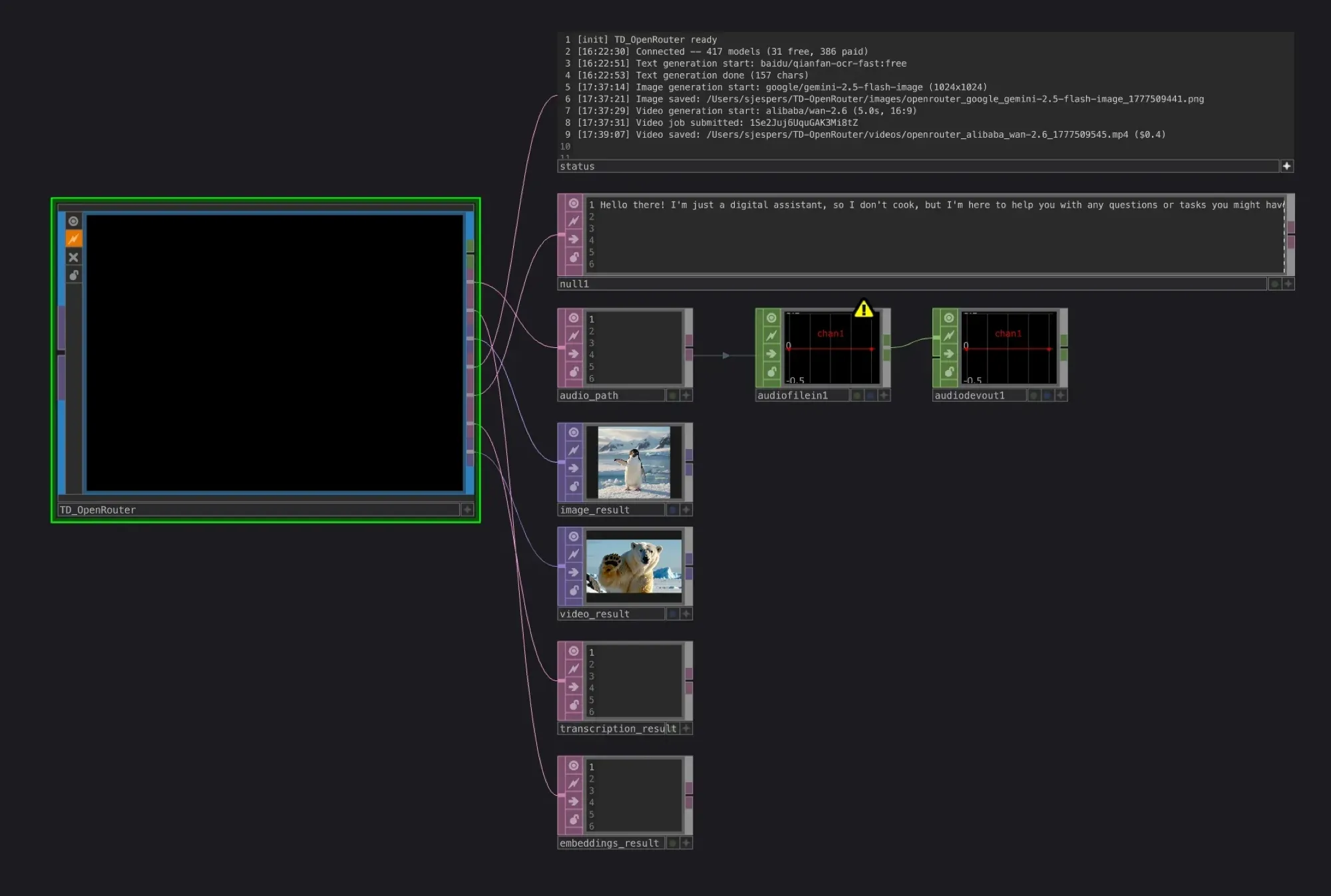
Results as operators
Text lands in DATs, images and videos load into TOPs, audio plays through a CHOP, and embeddings arrive as data you can wire anywhere.
- 05
Never blocks the timeline
Requests run on background threads with an activity log that timestamps every event. Abort a generation mid-stream and keep what you have.
- 06
Stdlib only
No external dependencies. It uses the Python that ships with TouchDesigner, so it works on any machine you drop it on.
Outputs
Drop it in. Wire it up.
Every output is a regular TouchDesigner operator, ready to wire into the rest of your network.
Built for live work
Whether you're building a live AV performance, an interactive installation, a generative art piece or a real-time prototype, TD OpenRouter lets you tap into the latest frontier models without writing a line of HTTP code or installing a single Python package.
Quick start
- Drag TD_OpenRouter.tox into any network.
- Paste your OpenRouter API key on the Connection page.
- Pulse Discover Models to fill every model dropdown.
- Switch to Text Generation, type a prompt, pulse Generate.
Parameter pages
| Page | What it does |
|---|---|
| Connection | API key, sampling (temperature, top P, top K, max tokens), Discover Models |
| Text Generation | Chat with optional image and video references, JSON mode, streaming |
| Image Generation | Text-to-image with size and output folder |
| Video Generation | Text-to-video, submitted and polled in the background |
| Embeddings | Text to vector |
| Audio Generation | Text-to-speech or audio generation, routed automatically |
| Transcription | Speech-to-text |